
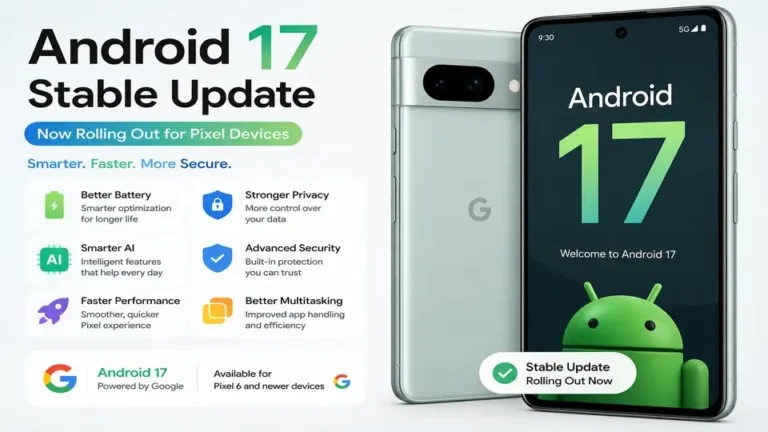
Google has officially released the stable version of Android 17 for supported Pixel devices, including the Pixel 6 series and newer. This update focuses on internal refinements rather than visual changes, prioritizing system speed, stability, and security to improve the daily user experience across the operating system.
The software introduces smarter battery management, AI-driven background optimization, and enhanced privacy controls. Although the design remains familiar, users will notice faster app launching and smoother animations. This release aims to provide a more reliable and efficient performance for tasks like multitasking, gaming, and photography.
After months of beta testing, developer previews, and countless leaks, Google has officially released Android 17 Stable for supported Pixel devices. If you own a Pixel smartphone, chances are you’ve already received the update notification—or it will arrive very soon.
But here’s the big question:
Is Android 17 actually worth installing, or is it just another yearly Android update?
The short answer is yes, but probably not for the reasons you expect.
Unlike previous Android releases that introduced major visual changes, Android 17 focuses on making your phone faster, smarter, safer, and more reliable. Instead of redesigning Android from scratch, Google has improved the features people use every single day.
Whether you’re checking WhatsApp, browsing Instagram, taking photos, watching YouTube, attending online classes, or working on the go, Android 17 aims to make every interaction smoother.
In this article, we’ll explain everything you need to know about Android 17 in simple English—without confusing technical jargon.
📌 Android 17 at a Glance
| Category | Details |
|---|---|
| Operating System | Android 17 Stable |
| Released By | |
| Rollout Started | Stable rollout for eligible Pixel devices |
| Supported Devices | Pixel 6 Series and newer eligible Pixel devices |
| Major Focus | Performance, Privacy, Security, AI & Battery |
| Installation Size | Varies by device |
| Recommended? | ✅ Yes for most users |
🚀 Quick Highlights
- ✅ Android 17 Stable is officially rolling out.
- ✅ Faster overall system performance.
- ✅ Better battery optimization.
- ✅ Smarter AI-powered background management.
- ✅ Improved privacy controls.
- ✅ Stronger security protection.
- ✅ Better multitasking experience.
- ✅ Smoother animations across the system.
- ✅ Faster app launching.
- ✅ Improved stability for daily use.
Why Android 17 Feels Different
Every year, Android users expect Google to launch flashy new features and completely redesign the interface.
This year, Google took a different approach.
Instead of changing everything you already know, Android 17 improves the experience behind the scenes.
Think of it like servicing your car.
Your car may look exactly the same from the outside, but after a professional service, it drives more smoothly, consumes less fuel, and performs better.
Android 17 follows the same philosophy.
The design remains familiar, but almost every important part of the operating system has been refined.
This means your phone feels faster—not because of a dramatic redesign, but because Google optimized the software that powers everything.
Who Can Install Android 17?
Google has started rolling out Android 17 Stable to supported Pixel devices.
If your phone is listed below, you are eligible for the update.
Supported Pixel Devices
| Device | Android 17 |
|---|---|
| Pixel 6 | ✅ Supported |
| Pixel 6 Pro | ✅ Supported |
| Pixel 6a | ✅ Supported |
| Pixel 7 | ✅ Supported |
| Pixel 7 Pro | ✅ Supported |
| Pixel 7a | ✅ Supported |
| Pixel Fold | ✅ Supported |
| Pixel Tablet | ✅ Supported |
| Pixel 8 | ✅ Supported |
| Pixel 8 Pro | ✅ Supported |
| Pixel 8a | ✅ Supported |
| Pixel 9 | ✅ Supported |
| Pixel 9 Pro | ✅ Supported |
| Pixel 9 Pro XL | ✅ Supported |
| Pixel 9 Pro Fold | ✅ Supported |
Note: Google rolls out updates in phases. If you don’t see the update immediately, it may arrive over the next few days.
To check manually:
Settings → System → Software Update → Check for Updates
Android 16 vs Android 17
Many Pixel users wonder whether Android 17 is a major upgrade over Android 16.
Here’s a quick comparison.
| Feature | Android 16 | Android 17 |
|---|---|---|
| Performance | Good | Faster & More Optimized |
| Battery Management | Good | Smarter AI Optimization |
| Privacy | Strong | More User Control |
| Security | Monthly Updates | Enhanced Protection |
| Background Apps | Standard | Better Memory Handling |
| Multitasking | Smooth | More Responsive |
| System Animations | Fluid | Even Smoother |
| AI Integration | Limited | Expanded Across System |
As you can see, Android 17 isn’t about introducing dozens of flashy features. Instead, it improves almost every area that affects your daily experience.
First Impressions After Updating
One thing you’ll notice almost immediately is that your Pixel still looks like a Pixel.
Google hasn’t changed the clean design that users already love.
But after using Android 17 for a few minutes, the improvements start becoming noticeable.
Apps launch a little faster.
Scrolling feels smoother.
Switching between apps is quicker.
Even unlocking the phone feels more responsive.
These are small changes individually, but together they make the entire phone feel newer.
Performance That You Can Actually Feel
Performance improvements are one of Android 17’s biggest strengths.
Instead of pushing your phone’s hardware harder, Google has focused on making the software more efficient.
That means your Pixel can do more work while using fewer system resources.
During everyday use, you’ll likely notice:
- Faster app opening times.
- Smoother scrolling.
- Better multitasking.
- Reduced lag during heavy usage.
- Faster switching between apps.
- More stable gaming performance.
- Improved responsiveness across the system.
The best part?
These improvements happen automatically.
You don’t need to enable any special settings or install additional apps.
Android 17 simply works more intelligently behind the scenes.
Why This Update Matters More Than You Think
Some Android updates introduce exciting new features that people try once and forget.
Android 17 is different.
Google has focused on improving the parts of Android that millions of people use every single day.
Whether you’re replying to emails, joining online classes, editing photos, browsing social media, or simply unlocking your phone dozens of times a day, Android 17 is designed to make each of those actions feel smoother.
It may not be the most dramatic Android update ever released—but it could easily become one of the most practical and useful updates for Pixel users.
Android 17 Features Explained: Smarter AI, Better Battery, Stronger Privacy, and a Faster Pixel Experience
If you have already updated your Pixel phone to Android 17, you may not notice every improvement immediately. That’s because many of the biggest changes work quietly in the background.
Instead of adding dozens of flashy features, Google has focused on improving the experience you have every day. Whether you’re opening apps, switching between tasks, watching videos, or simply leaving your phone idle overnight, Android 17 works smarter than before.
Let’s take a closer look at what has actually changed.
🔋 Smarter Battery Management
Battery life is one of the biggest concerns for smartphone users. Nobody likes carrying a charger everywhere.
With Android 17, Google has improved the way the operating system manages battery usage.
Instead of allowing every app to keep running in the background, Android now learns which apps you use regularly and which ones you rarely open.
For example, if you only use a shopping app once a month, Android automatically reduces its background activity. That means fewer unnecessary notifications, less battery drain, and better overall efficiency.
Battery Improvements Include
- Better standby battery life
- Smarter background app control
- Reduced power usage while idle
- More efficient charging management
- Better battery health over time
For many Pixel users, this may not translate into several extra hours of battery life, but it should make battery performance more consistent throughout the day.
🤖 Artificial Intelligence Is Now More Useful
Artificial Intelligence is becoming a major part of Android, but Google isn’t forcing AI features into every corner of the system.
Instead, Android 17 uses AI where it actually helps.
For example:
Imagine you always open Gmail, Chrome, and WhatsApp every morning before work.
Over time, Android learns this routine and prepares these apps in advance, helping them launch faster.
Similarly, if you usually connect your Bluetooth earbuds after leaving home, Android can respond more intelligently to your daily habits.
This kind of AI works quietly in the background without requiring you to enable anything.
It simply makes your phone feel smarter.
⚡ Faster Performance Across the Entire System
One of the first things many users notice after updating is how responsive the phone feels.
This isn’t because Android 17 uses more power.
It’s because Google has optimized how Android manages memory and system resources.
Here are some improvements users may notice:
- Apps open more quickly.
- Animations feel smoother.
- Scrolling becomes more fluid.
- Multitasking is faster.
- Less waiting when switching between apps.
Even older supported Pixel devices benefit from these optimizations.
That’s good news for users who don’t plan to upgrade their phone this year.
🔒 Stronger Privacy Protection
Privacy continues to be one of Google’s biggest priorities.
Android 17 gives users even more control over what apps can access.
Instead of simply asking for permissions once and forgetting about them, Android now provides clearer permission management and better transparency.
For example:
If an app wants access to your microphone or location, it’s easier to understand exactly what permission you’re giving.
Users can also review permissions more easily and remove unnecessary access whenever they want.
This helps reduce the chances of apps collecting information that they don’t actually need.
🛡️ Better Security Without Extra Work
Security improvements aren’t always visible, but they’re some of the most important updates in Android 17.
Google has strengthened protection against malicious apps, phishing attempts, and software vulnerabilities.
Combined with Google Play System Updates, Pixel users receive security improvements more efficiently than before.
Whether you’re using online banking, UPI payments, shopping apps, or storing important documents, Android 17 provides better protection without changing how you use your phone.
📱 Multitasking Feels More Natural
Modern smartphone users rarely use just one app at a time.
You might be watching YouTube while replying to WhatsApp messages or checking Google Maps during a phone call.
Android 17 improves memory management so apps stay active for longer.
That means fewer app reloads and a smoother multitasking experience.
This is especially helpful for students, professionals, and content creators who constantly switch between different applications.
📷 Camera Experience Gets Small but Meaningful Improvements
The camera hardware remains the same, but Android 17 improves how the software works with it.
Users may notice:
- Faster camera opening
- Quicker image processing
- Better HDR consistency
- Faster switching between photo and video modes
- Improved stability while capturing multiple photos
These aren’t revolutionary changes, but they make photography feel more responsive.
🌐 Better Connectivity
Android 17 also includes several improvements that many users won’t immediately notice but will appreciate over time.
Google has optimized:
- Wi-Fi stability
- Bluetooth connectivity
- Mobile network switching
- Device-to-device communication
This means fewer random disconnections and a more reliable wireless experience.
🎮 Gaming Performance
If you occasionally play games like BGMI, Call of Duty Mobile, Asphalt, or Clash Royale, Android 17 includes optimizations that help games run more smoothly.
Google has improved resource management so games can maintain stable performance while reducing unnecessary background activity.
Although gaming performance still depends on your device’s hardware, Android 17 helps supported Pixel phones make better use of their available resources.
💬 Real-World Experience After Using Android 17
After spending some time with Android 17, one thing becomes clear—it isn’t trying to impress you with flashy animations or a completely new interface.
Instead, Google has focused on polishing the experience that Pixel users already love.
Everything feels just a little faster.
Just a little smoother.
Just a little smarter.
Those small improvements may not sound exciting on paper, but together they create a noticeably better experience over weeks and months of daily use.
And honestly, that’s exactly what most users want from a software update.
Should You Install Android 17? Here’s My Honest Opinion
After exploring Android 17 from every angle, one question still remains:
Should you install it right away?
For most Pixel users, the answer is Yes.
Android 17 may not completely change how your phone looks, but it significantly improves how your phone feels. Google has focused on refining the experience instead of redesigning it.
From smoother animations to better battery management, stronger privacy, and smarter AI, Android 17 delivers improvements that you’ll appreciate every day.
What I Liked About Android 17
After reviewing the update and comparing it with previous Android versions, these are the biggest strengths.
✅ Better Overall Performance
Apps launch faster, multitasking feels smoother, and the system responds more quickly.
Even simple actions like opening the camera or switching between apps feel more polished.
✅ Battery Optimization That Actually Helps
Instead of making unrealistic promises, Google has improved battery efficiency through better background management.
Most users won’t suddenly get two extra days of battery life, but they should notice more consistent battery performance throughout the day.
✅ Privacy Improvements
Android continues to give users more control over personal information.
Managing permissions is easier, and apps have fewer opportunities to collect unnecessary data.
✅ Security Comes First
Every Android update includes security improvements, but Android 17 goes further by strengthening system protection and improving how security updates are delivered.
For users who rely on digital payments, banking apps, or work-related data, this is one of the most valuable improvements.
A Few Things You Should Know
No software update is perfect.
Although Android 17 Stable has been thoroughly tested, some users may notice small issues during the first few weeks after installation.
These could include:
- Slightly higher battery usage immediately after updating while the system optimizes itself.
- Minor app compatibility issues until developers release updates.
- Temporary heating during the first day after installation.
These are common after major Android releases and usually disappear after a few days.
Tips Before Updating
Before installing Android 17, take a few minutes to prepare your phone.
✔ Back Up Your Data
Always create a backup of important photos, contacts, messages, and documents.
✔ Charge Your Device
Keep your battery above 50%, or connect your phone to a charger during installation.
✔ Use a Stable Wi-Fi Connection
The update package can be several gigabytes in size.
Downloading over Wi-Fi is faster and more reliable.
✔ Keep Enough Free Storage
Delete unnecessary files if your storage is almost full.
Having enough free space helps the installation complete without problems.
FAQ
Is Android 17 officially available?
Yes. Google has officially started rolling out Android 17 Stable for eligible Pixel devices. The rollout is gradual, so some users may receive it earlier than others.
Which Pixel phones support Android 17?
Android 17 is available for the Pixel 6 series and newer supported Pixel devices, including Pixel Fold, Pixel Tablet, Pixel 8 series, and Pixel 9 series.
Will Android 17 improve battery life?
Yes. Google has introduced smarter battery optimization, but the exact improvement depends on your device, installed apps, and daily usage.
Does Android 17 change the user interface?
Not significantly.
Google has focused more on performance, stability, privacy, and security rather than introducing a completely new design.
Is Android 17 safe to install?
Yes.
The Stable version is designed for everyday users and includes Google’s latest security improvements and bug fixes.
How can I check if the update is available?
Go to:
Settings → System → Software Update → Check for Updates
If you don’t see the update immediately, don’t worry. Google releases updates in phases.
Final Verdict
Android 17 proves that a great software update doesn’t always need dramatic visual changes.
Instead of introducing unnecessary features, Google has refined the areas that matter most—performance, battery life, privacy, security, and everyday usability.
After reading through the improvements, one thing becomes clear: Android 17 is about making your Pixel phone work better, not just look different.
If you own a supported Pixel device, this update is definitely worth installing.
It won’t transform your phone overnight, but over time you’ll notice smoother performance, better efficiency, and a more polished Android experience.
Key Takeaways
- Android 17 Stable is rolling out to eligible Pixel devices.
- The update focuses on speed, security, privacy, AI, and battery optimization.
- Daily tasks feel smoother thanks to better system optimization.
- Most supported Pixel users should install the update.
- The rollout is phased, so availability may vary by region and device.
Suggested Image ALT Text
Android 17 Stable Update running on a Google Pixel smartphone with new AI, privacy, and performance features.
Internal Linking Suggestions
You can link this article to:
- Android 17 Hidden Features You Should Try
- Best Google Pixel Tips and Tricks
- How to Improve Battery Life on Pixel Phones
- Pixel 9 vs Pixel 8: Full Comparison
- Best Android Features Every User Should Know
Disclaimer
This article is based on Google’s official Android 17 rollout announcements and verified information available at the time of publication. Some features may vary depending on your Pixel model, region, and future software updates.